XMoni Icon
🖥️ 9 Languages · DPI-Aware · Desktop Hardware Monitor

A Light & Elegant
Desktop Hardware Dashboard

Real-time monitoring for CPU · GPU · RAM · Network · Disks. 9 languages including EN/ZH/JA/KO/FR/DE/AR/PT/ES. DPI-aware scaling, translucent floating window, always on top.
78% GPU LOAD
XMoni V0.7.9 Screenshot

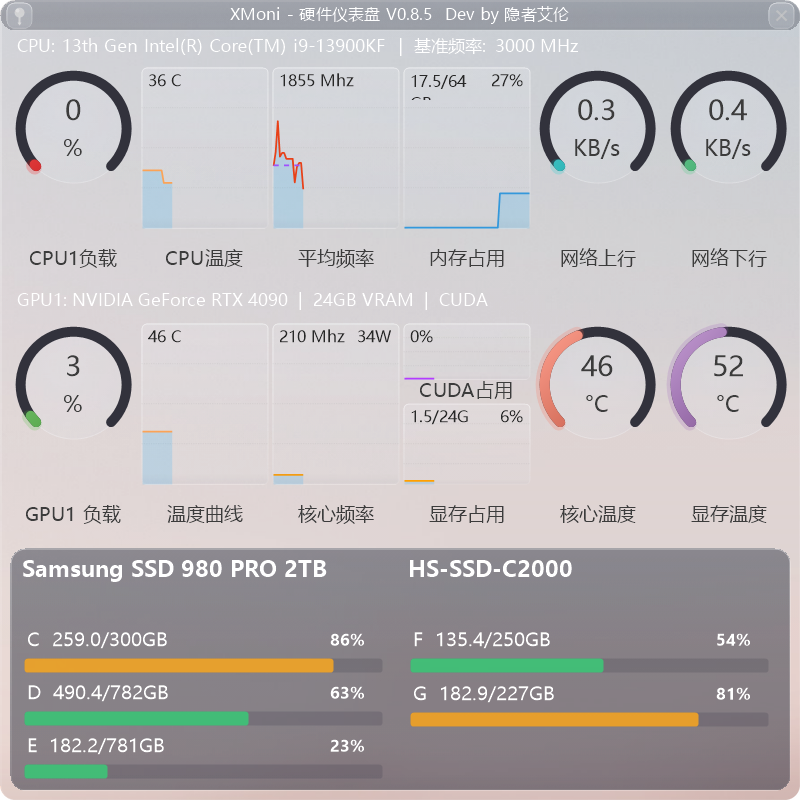
▲ XMoni Screenshot — CPU / GPU / RAM / Network / Disk Real-time Monitoring

Core Monitoring

5-in-1 real-time monitoring, precise & instant

CPU Processor

Load gauge + dual-line frequency chart. Solid blue = current frequency, dashed purple = turbo baseline. Compare boost states at a glance. Compatible with all Intel/AMD CPUs.

🎮

GPU Graphics

Core load gauge · CUDA compute (NVIDIA only) · Frequency curve · Temperature · Power · VRAM usage. Per-GPU header shows model/VRAM/CUDA. Smart brand detection: NVIDIA shows CUDA, Intel/AMD auto-hides. Intel iGPU auto-hides temperature gauges.

🧠

RAM Usage

Used/total GB + real-time percentage sparkline. Reads physical memory data with precision.

🌐

Network Traffic

Upload/download gauges with adaptive units: ≥1 MB/s → MB/s (2 decimals), <1 MB/s → KB/s (1 decimal). Triple-layer filtering excludes virtual/Bluetooth/hidden adapters.

💾

Physical Disks

WMI physical disk → partition → drive letter mapping. Per-disk used/total GB + percentage bar. Multi-disk, multi-partition. USB hot-plug devices auto-detected with [USB] label.

🎨

Deep Customization

15 color presets (incl. background/gauge/disk highlight/text) · 5 independent fonts (title/value/detail/disk model/drive info) · 9 languages with instant switch (EN/ZH/JA/KO/FR/DE/AR/PT/ES) · DPI scaling (100%/125%/150%/175%) · 50-1000ms refresh · 0-100% opacity · Glow effect · System tray · Square resolution presets.

Changelog

Complete evolution from V0.1 to V0.8

V0.8.0
2026-06-24
UI 9-Lang DPI I18n Fixes
View details (click to expand)

V0.8.0 — 9 Languages + Five Fonts + DPI Scaling + UI Rebuild

  • 9-language support: EN/ZH/JA/KO/FR/DE/AR/PT/ES, auto-detect on first launch
  • Apply button live preview: colors/fonts/refresh/tray apply instantly
  • 5 independent font controls: Title/Value/Detail/Disk Model/Drive Info
  • Global uniform font scaling across all widgets
  • Reset Default Fonts button
  • Top-left pushpin + top-right gray close button
  • Corner radius unified at 15px (main + disk)
  • Full 9-language switching: menus/gauges/settings all i18n with instant apply
  • Settings window opens on left without overlapping main
  • Other Settings tab restructured with TableLayoutPanel
  • Adaptive network speed: ≥1 MB/s→MB/s(2dec), <1 MB/s→KB/s(1dec)
  • NVIDIA shows CUDA; Intel/AMD auto-hides CUDA; Intel iGPU hides temp gauges
  • RTX 5090 CUDA detection fix (PerformanceCounter fallback to LHM GPU Core)
  • DPI scaling support: 100%/125%/150% all adaptive
  • Memory leak fixes: GDI fonts, WMI objects, SettingsForm temp Fonts
  • GC optimization: reduced frequency + non-blocking mode
  • Disk flash fix during USB ejection
  • Tray icon cleanup on exit
V0.7.9
2026-06-23
I18n Website Fixes
View details (click to expand)

V0.7.9 — Multi-Language + Website I18n

  • Added Language/zh.json + en.json (90+ key pairs)
  • Settings: Language dropdown + Apply button + instant restart
  • All UI text internationalized (gauges, menus, tooltips)
  • New English landing page + CN/US flag language switcher
  • Mobile hamburger menu + legacy changelog fully translated
  • Fixed Apply button, text/bg color not working
  • Fixed 1650Ti dual-GPU laptop GPU load stuck at 0%

V0.7.8 — Button UX + CUDA Smart Detection + Spacing Optimization

  • Top-left pin + top-right close button with hover tooltip
  • NVIDIA shows CUDA; Intel/AMD auto-hides CUDA sparkline
  • hdrGap spacing: 2px at Mini, proportional scaling
  • Context menu "Toggle Pin" → "Always on Top"
  • Disk update: DriveInfo hotplug detection + 60s periodic refresh

V0.7.7 — Disk Fix + Uniform Spacing + Square Resolution

  • Fixed multi-letter disks not showing (Samsung 3-letter drives)
  • Disk panel min height: max(150,28%) → 168~336px
  • Square resolution presets: Mini 600 / Small 800 / Medium 1000 / Large 1200
  • Default 800×800, minimum 600×600
  • All titles with uniform 6px vertical spacing
  • Loading indicator auto-removed when data is ready
  • CUDA/VRAM font 10→9pt, no overflow on small screens
  • Removed startup delay; bitmap cache reuse for drag smoothness
  • Debug X close syncs checkbox; title simplified
  • StringFormat GDI leak fix (8 locations), GC enhancements
  • Dynamic header font scaling for 4K displays

V0.7.6 — System Tray + Menu Checkboxes + Startup Optimization

  • Added system tray icon; double-click to restore/minimize
  • Pin/Debug/Tray checkmarks synced
  • Fixed glow toggle + tray residue + drag stutter
  • Fixed Debug X close not syncing checkbox
  • Startup fix: removed 200ms delay + bitmap reuse

V0.7.5 — Title bar version number + base clock i18n

  • Title bar shows current version
  • "Base: 3000 MHz" → localized base clock label

V0.7.4 — GPU Header Full Model Name

  • GPU header shows full model: "NVIDIA GeForce RTX 4090 | 24GB VRAM | CUDA"
  • Fixed GPU gauge titles: "GPU1GPU Load" → "GPU1 Load" etc.
  • CPU and GPU header text in pure white

V0.7.3 — VRAM Usage Format

  • VRAM top-left: "0.9G" → "0.9/24G" (used/total)

V0.7.2 — CPU/GPU Info Header Row

  • Added CPU info row: model + base clock
  • Added GPU info row: model + VRAM + CUDA
  • Gauge title prefix: CPU1/GPU1/GPU2

V0.7.1 — CPU Dual Frequency Curves

  • Blue solid (current freq) + Purple dashed (turbo baseline)
  • SparklineRenderer: added dual-line rendering

V0.7.0 — Multi-GPU Support + Load Matching

  • GpuInfo data structure; dynamic multi-GPU UI
  • Sensor matching rewritten: D3D 3D + GPU Core + D3D Cuda
  • Total GPU load = max(D3D 3D, GPU Core, D3D Cuda)
  • CUDA sparkline uses real values; network triple-layer filtering
  • Auto font scaling 0.75x-1.55x; resolution presets
  • Auto disk panel font; title bar with rounded dark background
V0.6.0-0.6.34
2026-06-19 — 2026-06-20
Architecture Rebuild Performance UI Polish Bug Fixes
View details (click to expand)
  • GpuInfo 类 + List<GpuRow> Dynamic UI Layout
  • Sensor fallback fixes for discrete GPU load not updating
  • Priority NVIDIA(3)>AMD(2)>Intel(1), prevents iGPU from overriding dGPU data
  • Net speed FmtSpd() fix: preserves actual value when v<1 MB/s
  • Title bar 100px→30px, white text on rounded background
  • Title color back to dark, uniform 20px rounding
  • Font.GetHeight(g) Dynamic calculation, font cache with leak prevention
  • Intel iGPU compatible, WMI query throttling eliminates stutter
  • UpdateLayeredWindow + BLENDFUNCTION for glass effect
  • Resolution/Refresh Rate/Opacity presets, large 18pt gauge text
  • BlackSharp.Core.dll + DiskInfoToolkit.dll + RAMSPDToolkit-NDD.dll
  • Full dump + DiskIndex mapping + pin button
  • Full label localization, Win32_DiskDrive→partition→letter mapping
  • DLL reference Private=true, 5-col CPU + 5-col GPU + full-width disk layout
  • UTF-8 encoding corruption → complete rewrite of all core files
  • Custom GDI+ render pipeline: GaugeRenderer/SparklineRenderer/DiskPanel
  • MainForm 560 lines: free resize + 8-direction drag + context menu + settings
  • Removed WinRing0/SuperIO/HWiNFO legacy code
V0.5.x
2026-06-19
UI Foundation Fixes
View details (click to expand)
  • V0.5h:Fixed sparkline occlusion in 900×520 window, disk panel style, added About page
  • V0.5g:GDI+ Basic Dashboard + Sparklines + Disk Panel + Debug Window + Single Instance
V0.1-0.4
2026-06
Project Inception
View details (click to expand)
  • LibreHardwareMonitor sensor backend, WinForms GDI+ basic UI
  • settings.ini persistence, PerformanceCounter+WMI data sources
  • 5D monitoring: CPU/GPU/RAM/Network/Disk, TopMost + borderless drag

Tech Specs

Light · Precise · Compatible

<70MB
RAM Usage
50-1000ms
Refresh Rate
5D
Dimensions
9
Languages
Multi-GPU
GPU Support
DPI
Scaling Aware

Technology Stack

Curated mature & reliable technology stack

C# .NET Framework 4.7.2 Windows Forms LibreHardwareMonitorLib GDI+ Rendering Engine WMI Queries PerformanceCounter UpdateLayeredWindow Per-pixel Alpha Transparency 9-Lang JSON Locale DPI Auto-Scaling GPU Brand Smart Detection

Get Started

Completely free · No background services · No ads

XMoni v0.8.0
For Windows 10 / 11 64-bit
Requires .NET Framework 4.7.2 Runtime
⚠ Beta version — may contain bugs
Download XMoni v0.8.0.zip
ℹ ℹ "Unknown publisher" warning on launch?

Since the app is not code-signed (EV cert costs $300+/yr), Windows Defender SmartScreen may show "Windows protected your PC". This is a normal safety warning. How to proceed:

  1. Right-click XMoni.exe → Properties → Check "Unblock" → OK
  2. Or click "More info" → "Run anyway" in the SmartScreen pop-up
  3. No registry writes, no internet access, no background services — safe to run
💡 Run as Administrator Recommended

For more accurate CPU frequency and temperature sensor data, right-click XMoni.exe → Run as administrator. WMI hardware interface provides more complete sensor data under admin privileges.

Historical versions: v0.7.0 | v0.7.6 | v0.7.7 | v0.7.8 | v0.7.9

Double-click to run. No installation required. Config saved to C:\Users\YOUR_USERNAME\AppData\Local\XMoni